Budget buying guide
Best Laptops Under Rs. 50,000 in Pakistan
You've got Rs. 50,000 to spend, and you're looking for a reliable used laptop that can get your work done. Maybe that's programming, office work, graphic design, or a bit of light video editing. You're hoping to get four or five good years out of it, so you want to choose carefully.
Before you get tempted by extra RAM or a bigger SSD, focus on the things that are harder to change later: the processor, screen size, display resolution, and build quality. RAM and storage can often be upgraded, depending on the model. A processor that struggles with your work or a screen that's uncomfortable to use is much harder to fix. Let's look at the options within Rs. 50,000 and where each one fits.
The quick answer
Where should you start?
Start by comparing the Lenovo ThinkPad T480s at its recorded base price of Rs. 47,000. Our pick focuses on study, writing, and everyday office work. Check the exact unit before deciding.
Intel Core i7 (8th Gen) · 8GB DDR4-2400 · 256GB PCIe NVMe SSD
See why we picked it
These recommendations are based on recorded specifications and seller listings. We have not tested these units ourselves. Guide updates and seller check dates are separate; confirm price and stock before paying.
Compare the shortlist
Each price below belongs to the exact base configuration and condition shown. These are recorded offers, with their original check dates.
| Laptop / best for | Recorded configuration | Base price / condition | Seller check |
|---|---|---|---|
| Lenovo ThinkPad T480sOur pick for study & work | Intel Core i7 (8th Gen)8GB DDR4-2400 / 256GB PCIe NVMe SSD14-inch FHD IPS | Rs. 47,000UsedRecorded low stock | Iqra Traders |
| Dell Latitude 7490Pick for RAM upgrades | Intel Core i5-8350U8GB DDR4-2400 / 256GB PCIe NVMe SSD14-inch FHD anti-glare | Rs. 49,000UsedRecorded low stock | NN Laptops |
| Dell Latitude 3310Lower-cost pick | Intel Core i3-8145U8GB DDR4-2400 / 256GB PCIe NVMe SSD13.3-inch HD anti-glare | Rs. 40,000UnspecifiedRecorded in stock | Tesla Laptops |
Why we picked these laptops
We compare the listed processor, RAM, SSD, display, upgrade options, and seller terms. The better buy is the configuration that suits your work and passes inspection.
01 / Our pick for study & work
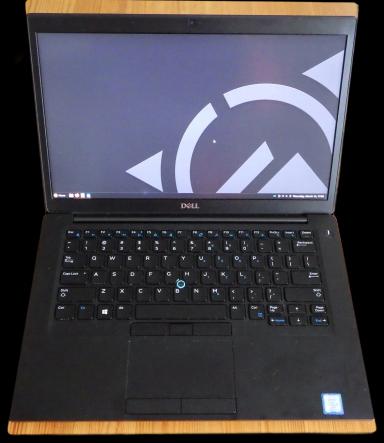
Lenovo ThinkPad T480s
Rs. 47,000
Recorded base configuration · Used
Study, writing, and everyday office work
The recorded configuration combines a four-core 8th Gen Core i7, 8GB RAM, a 256GB SSD, and a 14-inch Full HD IPS display. It makes a useful starting point if you want readable screen space and a laptop to carry between classes or meetings.
Before you buy
Some memory is soldered, with one upgrade slot. Confirm the exact CPU, fitted onboard RAM, battery health, and the seller's warranty terms. The recorded offer is a single used unit, so it may sell before you enquire.
02 / Pick for RAM upgrades
Dell Latitude 7490
Rs. 49,000
Recorded base configuration · Used
Buyers planning a later memory upgrade
The listed Core i5-8350U configuration has four cores, 8GB RAM, a 256GB SSD, and a 14-inch Full HD display. Its two RAM slots and recorded 32GB maximum make it worth comparing if you plan to add memory later.
Before you buy
The listed base configuration leaves little room in this budget for upgrades. A larger RAM or SSD configuration needs its own quote. Ask about the panel, battery condition, and the recorded checking warranty before paying.
03 / Lower-cost pick
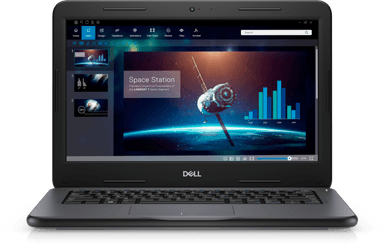
Dell Latitude 3310
Rs. 40,000
Recorded base configuration · Unspecified
Documents, browsing, and online classes
The recorded Core i3-8145U configuration includes 8GB RAM and a 256GB NVMe SSD. It leaves more of the budget available for accessories or repairs, and is worth considering when your workload is mainly documents and browsing.
Before you buy
This is a two-core processor with a 1366×768 HD screen. It is a less attractive choice for heavier multitasking or screen space. The seller has not confirmed the unit's condition; ask for that in writing.
What to look for under Rs. 50,000
Use this budget for a complete, usable laptop. Keep delivery, a replacement charger, battery work, or a RAM upgrade in mind when comparing two asking prices. A model name alone cannot tell you the condition of a used unit.
Compare the exact processor
A Core i5 or Core i7 badge alone does not describe performance. Check the complete processor model, generation, and core count. In this shortlist, the Latitude 3310 has two CPU cores; the listed T480s and Latitude 7490 have four. Choose around your actual workload.
Start with an SSD and enough RAM
For browsing, documents, and study, compare configurations with at least 8GB RAM and an SSD. Check whether the memory is soldered, how many slots are available, and the supported maximum. A cheap base price can become a poor fit once you add upgrade costs.
Inspect the screen and battery
Full HD gives you more workspace than a 1366×768 HD screen. Check resolution on the actual unit, then inspect for pressure marks, dead pixels, and flickering. Ask for a battery health report and test it unplugged; original factory battery-life claims do not describe a used battery.
Get the condition and terms in writing
Test the charger, keyboard, hinges, webcam, Wi-Fi, USB ports, and charging socket. Confirm any BIOS password or management lock is removed. Ask what the warranty covers, how long the checking period lasts, and whether returns, exchange, or repairs are offered.
New, used, or refurbished?
Our shortlist includes used laptops and a listing whose condition is unspecified. A new, box-packed option is not confirmed at this budget. Ask the seller to confirm the exact condition, any repairs, and what their warranty covers. A used business laptop is worth considering when its configuration, inspection results, and total cost meet your needs.
All listed laptops within Rs. 50,000
6 models listed · 4 with matching recorded seller quotes. Entries labelled “Price guide” need a matching quote; a stock badge reflects the recorded catalogue status.
Common questions
Which is the best laptop under 50000 in Pakistan?
The best choice depends on the exact unit and your work. Compare a ThinkPad T480s for its listed Full HD IPS display, a Latitude 7490 for two-slot RAM upgrades, and a Latitude 3310 for a lower recorded price. Our shortlist only includes models with matching seller offers recorded within Rs. 50,000. Reconfirm price, stock, and condition with the seller.
Can I buy a new laptop under Rs. 50,000?
Our catalogue does not currently confirm a new, box-packed laptop offer at this budget. Some entries are used and some sellers leave condition unspecified. Ask whether the exact unit is new, used, or refurbished, and get the condition and warranty in writing.
Is a laptop under Rs. 50,000 suitable for programming?
An SSD and at least 8GB RAM are a practical starting point for learning programming, editing code, and small projects. A four-core option is worth comparing for multitasking. Large builds, several virtual machines, or mobile emulators can need more RAM and a newer processor; check the requirements of your actual tools.
Can these laptops run games or edit videos?
The shortlisted configurations use integrated Intel graphics and are better suited to study and office work. Check the minimum and recommended requirements for your games or editing tools. For demanding gaming or regular video editing, compare a higher budget and measured performance for your software.
Do the prices include RAM or SSD upgrades?
Each price belongs to the recorded base configuration shown alongside it. An upgraded configuration, delivery, replacement battery, or accessory can change the total. Ask the seller for a complete quote that stays within your Rs. 50,000 budget.
Why do some listings say price guide?
A price guide has no recorded in-stock seller offer matching the exact base configuration and condition. Use it for research, then confirm a matching quote. Even recorded seller offers can change after their check date.